

Custom maps and mods that modify VData cannot be played on Valve’s servers by creating a Custom Match. This method allows you to play such mods with other people by launching the game in dedicated server mode.
Compared to listen server hosting this method is less prone to crashing when players have mismatching mods, can have higher performance, and it allows you to run multiple servers at the same time. However, it’s a bit harder to set up.
Setting Up for Hosting
Go to your Deadlock installation folder by right-clicking the game in your Steam library and selecting Manage > Browse local files.
Open the gameinfo.gi file located in game/citadel with any text editor.
Find the NetworkSystem section and modify it like this:
	NetworkSystem
	{
		CreateListenSocketP2P	2
		BetaUniverse
		{
			// ...
Find the ConVars section and modify it like this:
ConVars
{
"net_Note
Just like with Installing Mods, you have to redo these edits if the file gets updated by Valve
Return to Deadlock’s installation root (the folder that has the game folder in it) and create a .bat file with the following contents:
start .\game\bin\win64\deadlock.exe -dedicated -insecure -condebug -allow_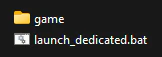
Hosting
- Launch the
launch_file that you created.dedicated.bat - In the opened console window enter
status. This will show information about the server. - Copy the
steamidvalue including the square brackets ([A:1:##########:#####]).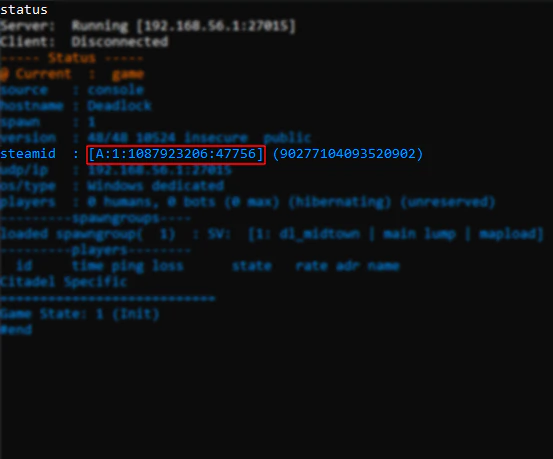
- Send it to other players so they can connect. The host can connect to the server the same way as other players.
Connecting
- Make sure that you have the “Dev command console” option checked in the game’s settings.
- Open the console by pressing
F7(this can be changed in the Keybinds settings). - Enter
connectfollowed by the server’s SteamID3 that you received from the host (connect [A:1:##########:#####]). - Pick your team and hero. If you want to change your team/hero you can use the
changeteam 0console command.- If you’re the first person to connect to the server, you probably want to pause the game as soon as you join to wait for other players.
Recording Replays
To record a SourceTV demo (replay) of a custom match, the server host can use the following console commands:
- Start the recording:
tv_record_ immediate 1; tv_ record demoname - Stop the recording:
tv_stoprecord
This will create a file called demoname.dem in the Deadlock/game/citadel folder. To play back the recorded demo, use the playdemo demoname command.