
Custom maps and mods that modify VData cannot be played on Valve’s servers by creating a Custom Match. This method allows you to play such mods with other people.
Note
If your players experience frequent crashes when using this method, try Hosting a Local Dedicated Server instead.
Hosting
- Make sure that you have the “Dev command console” option checked in the game’s settings.
- Open the console by pressing
F7(this can be changed in the Keybinds settings). - Enter
map dl_to launch into the current 3-lane map. If you’re playing a custom map, replacemidtown dl_with its name.midtown - You probably want to pause the game as soon as the map loads to wait for other players to connect.
- Open the console again and enter
status. This will show information about the server. - Copy the
steamidvalue including the square brackets ([A:1:##########:#####]).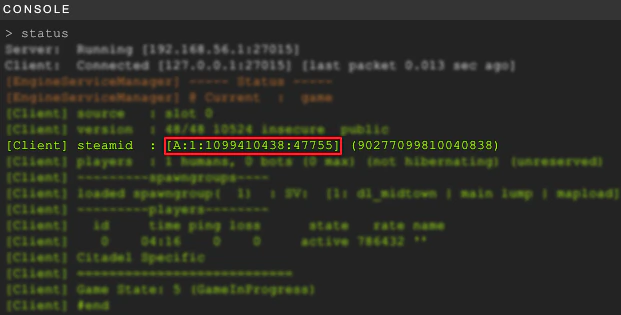
- Send it to other players so they can connect.
Connecting
- Make sure that you have the “Dev command console” option checked in the game’s settings.
- Open the console by pressing
F7(this can be changed in the Keybinds settings). - Enter
connectfollowed by the server’s SteamID3 that you received from the host (connect [A:1:##########:#####]). - Pick your team and hero. If you want to change your team/hero you can use the
changeteam 0console command.
Recording Replays
To record a SourceTV demo (replay) of a custom match, the server host can use the following console commands:
- Start the recording:
tv_record_ immediate 1; tv_ record demoname - Stop the recording:
tv_stoprecord
This will create a file called demoname.dem in the Deadlock/game/citadel folder. To play back the recorded demo, use the playdemo demoname command.