 CSDK 10
Important
This CSDK is outdated. Use
CSDK 12 instead.
Community Source Development Kit 10 (CSDK 10) is a community set of tools made by merging together files from the CS2 Workshop Tools and fixes made by the community members.
Reduced CSDK 10 is a stripped down version of the full CSDK 10 which does not require to download an older version of the game. It can be used for editing models, sounds, textures, vdata and more.
Installation
Download and unpack the archive.
Usage
Important
Steam must be running when launching the CSDK.
Launching with the Configuration Tool
For easier management of addons, use the configuration tool:
Launch the configuration tool by opening Reduced CSDK 10/Project8 with Tools - CFG launcher.bat.
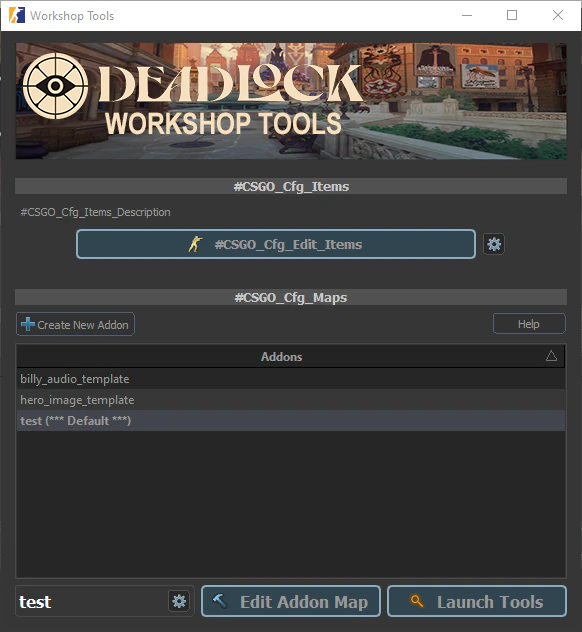
From here, you can:
Create a New Addon: Press the “Create New Addon” button and give it a name. This will automatically create two folders for your project:
content/citadel_: This is where you’ll place your source files, so they can be used by the tools. It is the main folder you’ll be working in.addons/<your_ addon_ name> game/citadel_: This is where the compiled versions of your assets will be stored. Compiled files usually end inaddons/<your_ addon_ name> _(e.g.,c .vtex_,c .vmdl_,c .vdata_).c
Launch Tools: Once an addon is created and selected, press the “Launch Tools” button (or double-click on the addon’s name) to open the  Asset Browser for that addon.